如何在FastStoneViewer程序中双击鼠标全屏播放

 时间:2026-04-25 09:57:09

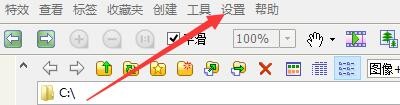
1、点击“FastStoneImageViewer”

如何在FastStoneViewer程序中双击鼠标全屏播放

2、在“FastStoneImageViewer”窗口中,点击“设置”

如何在FastStoneViewer程序中双击鼠标全屏播放

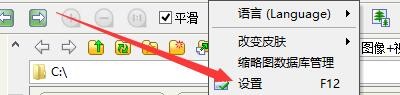
3、在弹出下拉栏中,再次点击“设置”

如何在FastStoneViewer程序中双击鼠标全屏播放

4、在“设置”窗口中,点击“视频文件”

如何在FastStoneViewer程序中双击鼠标全屏播放

5、在“视频文件”窗口中,点击“双击鼠标全屏播放”

如何在FastStoneViewer程序中双击鼠标全屏播放

6、点击“确定”即可

如何在FastStoneViewer程序中双击鼠标全屏播放

  • FastStoneViewer如何启动视频内部播放器功能
  • 如何更改FastStoneViewer程序中算法为Lanczos
  • FastStoneViewer如何启用缩略图边框矩形形状
  • FastStoneViewer如何启用自动锁定缩放比例图像
  • 如何设置FastStoneViewer更改文件名文字颜色
  • 热门搜索
    clothes怎么读 综合素质评价怎么写 一大写怎么写 宝贝的英文怎么写 盆腔积液是怎么引起的 为什么井盖是圆的 怎么解压文件 大象英语怎么读 芹菜肉饺子馅的做法 舌苔厚白是怎么回事