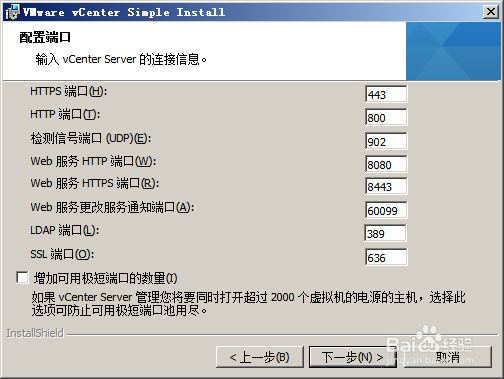
1、配置端口,这里输入vcenter的连接信息。包括https端口号码、SSL端口号码、LDAP端口号码等。

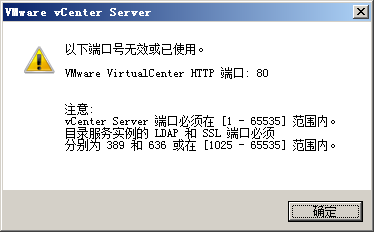
2、如果使用了80端口,会被提示说端口号码无效,原因是已经使用过
3、因此需要更换80端口,这里将80端口更换为800端口
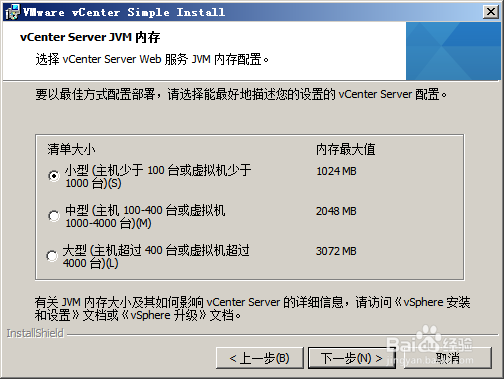
4、vcenter server jvm 内存的配置。可以选择1GB,也可以选择2Gb
5、然后会得到安装程序中已经包括一些安装包的提示
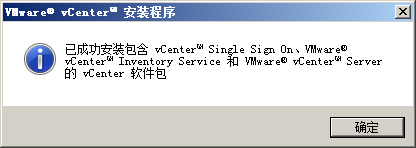
6、这是安装的必备条件。sign on 等信息。

7、安装路径的选择。最后选择一路默认条件完成安装即可。

时间:2026-04-22 18:03:45
1、配置端口,这里输入vcenter的连接信息。包括https端口号码、SSL端口号码、LDAP端口号码等。
2、如果使用了80端口,会被提示说端口号码无效,原因是已经使用过
3、因此需要更换80端口,这里将80端口更换为800端口
4、vcenter server jvm 内存的配置。可以选择1GB,也可以选择2Gb
5、然后会得到安装程序中已经包括一些安装包的提示
6、这是安装的必备条件。sign on 等信息。
7、安装路径的选择。最后选择一路默认条件完成安装即可。
